How to explore Techartist’s bones and muscles in 3D
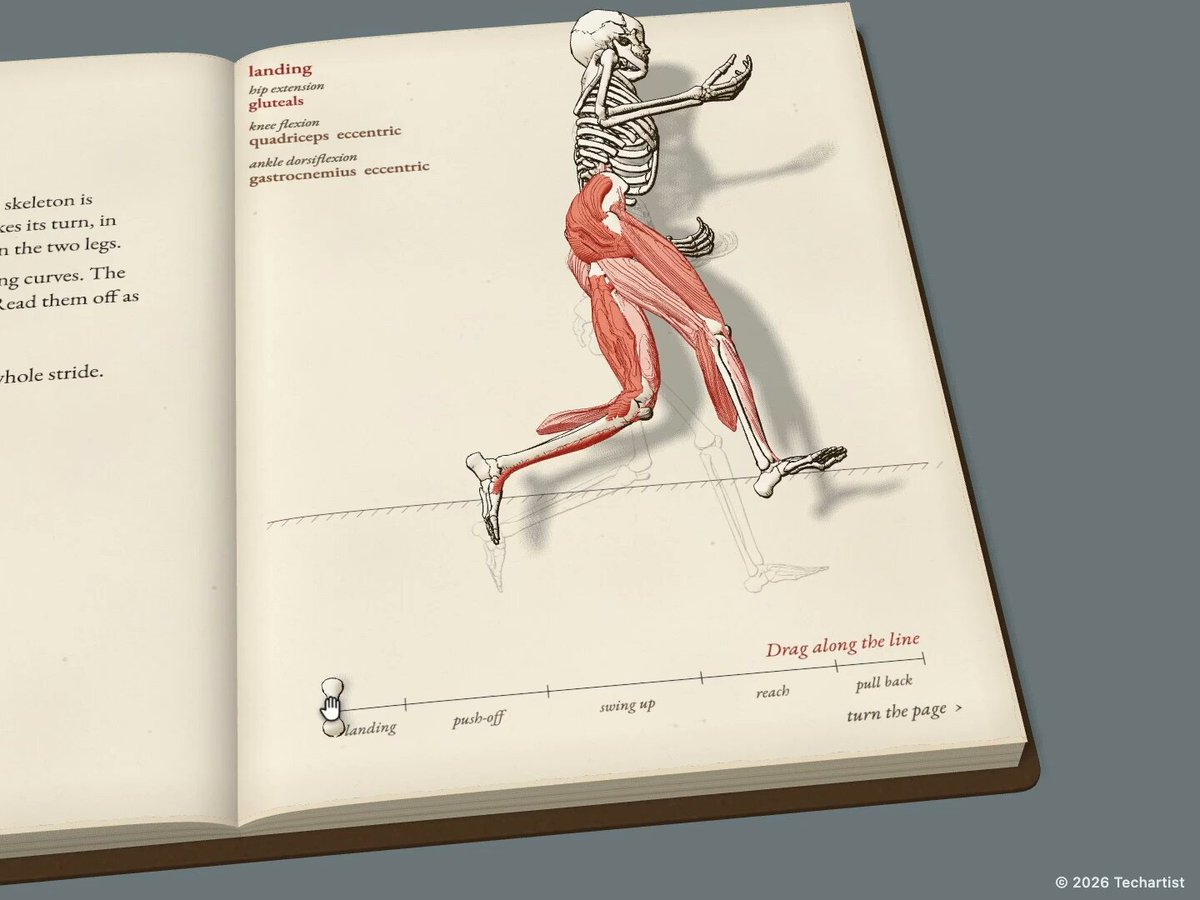
Techartist turns a page of anatomy into something you can manipulate. The public 13 Muscles chapter opens as a 3D notebook, with red cords running from a skeleton to handles. This guide helps you find the live work, understand the controls and keep the chapter separate from the larger book announced on November 9, 2026.
Watch the 3D book preview
A narrated preview with original demonstration excerpts. Captions are available.
Project and original demonstration by Techartist. MadeByWho editorial, authored with Opus and researched with Grok; synthetic Oliver narration via ElevenLabs.
Video transcript
Pull a cord, and the skeleton moves
Techartist is turning bones and muscles into a three-dimensional book
The live chapter, The Thirteen Muscles, lets you explore the front and back of the body, pull along a muscle's line of pull, and see a joint move
There is also a weighted-arm exercise and six questions to check your understanding
Techartist says the full book has ten lessons, with bones, joints, levers, planes, and more
That full book is still coming soon
You can try the live chapter today
Find the creator, the original update, and our getting-started guide on MadeByWho.
What you’ll take away
- Open the live chapter and choose whether to enable its sound.
- Use the notebook’s cords and page-turn prompts to explore one interaction at a time.
- Find the original update and distinguish a creator GitHub profile from published project source.
Start with the live chapter
Open The 13 Muscles from the creator’s own website. Its landing page describes the chapter and links to the interactive demo. Choose Enter for its sound-enabled entry, or Enter without sound if you are in a quiet room. Both choices refer to the same visual lesson; sound is an option, not evidence that a different chapter has loaded.
The opening view is a book on a grey background. The front-muscle page shows a skeleton, red cords and named handles. Let the initial loading screen finish before trying the controls. A static screenshot or social video can introduce the idea, but the creator’s browser demo is where you can change the scene yourself.
- Open the creator’s chapter page.
- Launch the interactive demo and wait for it to load.
- Choose Enter or Enter without sound.
- Read the short instruction printed on the current page before dragging.
Pull one cord, then let it relax
On the front page, start with one labelled cord. Drag its handle and watch which part of the figure responds. Release it before trying another handle. This gives you a direct comparison between the resting picture and the movement, rather than changing several things while you are still learning the interface.
The chapter frames the cord as a muscle’s line of pull. Use its labels and explanations to connect the visible movement to the named muscle. The useful learning activity is to make a prediction, try the interaction, then read the explanation again. Treat the illustration as a teaching model; it is not a measurement of an individual body.
- Pick a single named handle.
- Predict which joint will move.
- Drag, observe the change and release.
- Compare your prediction with the page explanation.
Follow the notebook prompts
Look for the small turn-the-page prompt on the book. The public chapter’s description includes front and back muscle views, a weighted-arm exercise, and six self-check questions. Work through the pages in sequence so that a new control has a clear context; do not assume that a control from one page has the same purpose on the next.
When you reach an exercise, change one input at a time and read the displayed instruction. For the questions, answer from what you have observed before revisiting the model. If the view is difficult to read on a small screen, a larger browser window may make the labels easier to follow. This is a practical viewing suggestion, not a claim of support for every device.
Separate the live chapter from the book announcement
The post supplied for this feature is a November 9, 2026 creator update about a larger 3D book. It announces ten interactive lessons and a test, and describes the whole book as coming soon. The website link we verified leads to The 13 Muscles chapter. A preview of the larger work and a link to one playable chapter should not be read as the same availability claim.
Start with the chapter that is publicly linked. For the complete book, check the creator’s latest website and original update. Availability can change after this guide’s review date. The feature video is an editorial introduction with credited creator footage, not a recording proving that MadeByWho completed every lesson in the forthcoming book.
Use the hosted version; check source before installing
The route verified for this guide is the hosted browser chapter. No installation was needed to reach its entry screen. We have not verified a public source repository, build instructions or a local setup procedure for this particular chapter, so this guide does not invent clone commands or promise that the book is open source.
Techartist does have a public GitHub profile with other projects. That is a useful creator link, but it is not a substitute for a repository specifically identified for this lesson. If the creator later publishes its source, use the README and license of that exact repository when deciding how to install, modify or reuse it.
Before you move on
- I can identify the live chapter and choose whether its sound starts.
- I can pull one cord, observe the response and release it before comparing another.
- I know where the original update and creator website are.
- I have not mistaken a preview announcement or a general GitHub profile for a released full book or project repository.
Sources
Official documentation and original sources used for this guide. Product features and availability can change; check the linked source before choosing a plan or publishing.
- The 13 Muscles — official chapter introduction iamtechartist.com
- The playable chapter inspected for this guide iamtechartist.com
- Techartist’s November 9 book update x.com
- Original November 8 chapter preview x.com
- Techartist’s GitHub profile github.com